Saturday, 3 December 2022

Full STEAM Ahead! The Digital Artifact and Final Reflection Part 2


"A person who never makes a mistake has never tried anything new." Sidewalk sign on Hastings St.

My journey to become a teacher of the 21st Century is well on its way. My vision of implementing a Maker Culture has been established and growing. My technological skills are developing every day. At first I challenged myself to learning a new digital tool each week and teaching it to a colleague or student. I do this much more often and can't believe that in a short time I have become a 'go to' person for trouble shooting tech at school. 

My mindset has changed. I used to be so anxious about making a mistake that I wouldn't try. Now I start, and if I make a mistake I try something else and maybe eventually ask for help. Speaking of help... thank you all for your thoughtful suggestions and feedback.  Your wealth of knowledge is humbling and I deeply appreciate your openness and generosity. 


My digital artifact is a video that educates others on the value of Maker Culture in schools. The concept of my final artifact changed several times... It took me awhile to figure out that what I wanted to say, and needed to say were not the same. Speaking of help, again... I could not have pulled it off without help from a friend (who happens to be a former student), which is a really positive and impactful way to learn, mistakes included. 

My plan for sharing this digital artifact is to first share it with staff at a 'lunch and learn,' then with the Parent Advisory Committee (PAC). With staff I will also be highlighting the STEAM Trolley (including assessment rubrics with the new reporting language that will be implemented next year) and inviting teachers to use it in their classrooms. As you may have read in my previous blog, our librarian and I have started a lunch time Maker Club with Grade 7 students taking on leadership roles.  


With the PAC I will feature the STEAM Trolley and have a couple of students share about their favourite activities. I will be challenging the PAC members to support our school by investing their hard earned funds in tools and digital technologies that can be shared by the school. Building a Lego Wall in the library and purchasing a few sets of screw drivers (Breaker Space), Makey Makey, or micro bits are the first requests. 

After several edits I decided that the video would be most useful to me if it was quite general. That way I can potentially share it with older students, but more importantly with my new staff, and PAC when I eventually get a job as a teacher-librarian. I would love to share some of the most popular activities at a school district workshop and the video might be suitable for that presentation as well, or I can make new one now that I know how. 


I have never spent so much time on a single project before! I wish I had logged the specific time spent just on making the video. I am going to guess it took around 30 hours. Writing the script was the first task. I think it started as five pages then I edited down to three.  I kept thinking to myself, 'Less is more!'   At the same time, I was collecting and cropping classroom photos, and screen shots to use in Google Slides. It seemed like a good way to organize the presentation so I could visualize potential  images as I read the script. 


I absolutely needed help with recording my voice and all the video related technology. I had never done anything like this before.  My friend borrowed a good quality microphone and we set up a little 'studio' in my bedroom closet. It took several tries to get the sound right. I needed to hang more blankets and lay down a yoga mat to get rid of the echoes. I think we recorded the script (or sections of it) fifteen times. I have a whole new appreciation for how much time and work goes into a five minute presentation. My friend used Audacity to split the audio into the right files and then helped me move it into Canva Video. I needed to watch several youtube tutorials on how to use Canva video. They were helpful in adding a level of professionalism to the final project. Most of editing process in Canva is 'drag and drop'  so it was very beginner friendly. There was a plethora of stock images and videos to use. It was finicky to get the images and sound lined up as well as the general animation timing. I already had a google account so uploading the project to youtube was straightforward.  I learned a great deal during the process and I am proud of my final project. I hope you enjoy it as well!

                                                                    My digital resource. 

My greatest take away from this learning journey is that as a future teacher-librarian I will need to be a digital mentor. I have a long way to go to catch up on skills, but I have already started and more importantly I have changed my mindset so that I am enjoying the process now (rather than being anxious). The technical skills I acquire(d) are gifts that I can use in my personal and professional work, as well as share with others. 

I have also learned that there is lots of solid research supporting Maker Culture, and STEAM activities. Making always 'seemed right' for my students, but it felt like a reward or extra activity. Creating a maker culture is really embedded deeply in our current curriculum and school district vision and goals. 

I have connected with great colleagues across the country. It is really refreshing to speak and write with teachers and teacher-librarians that are outside of my district and can offer a different perspective (or the same).

In the future I hope to get hired as a teacher-librarian where I can share my love of inquiry-based learning, literacy, social justice and Maker Culture. I will continue to grow as a learner myself so I can be a mentor and support person for my staff. 

In preparation of reflecting on my rationale I went back and read over my first blog entry. I just noticed that I did not title it or put on any labels. I was a nervous wreck when I wrote it because I wasn't sure it was going to be 'good enough' compared to others who have been posting to blogs for years. It took me awhile to figure out how to upload photos. 

As for the content, the key concepts have held true throughout my journey.  Curiosity, creativity, collaboration, authentic assessment, risk taking, educational balance, inquiry, engagement, and digital technology have remained central throughout my research, writing, and action. 

A significant challenge that has presented during this journey is equity. I work at a small school with a PAC that works hard to raise money, but doesn't come anywhere near other schools in more affluent areas. This is most evident in the lack of resources our school has in technology tools. I am hopeful that my video my help divert funds to our school library and STEAM initiatives. 


Students testing wind turbine (photo release with permission)
Finally, I really tried my best to respect the privacy of my students when posting photos. I used mostly my own photos because it represented my journey best. I took lots of videos in my class but if I cut the students faces out of the frame it wasn't effective. I wanted to include a video of my students testing their wind turbines but I could not get permission for photo release for one of the students. In the end, I didn't use any videos although I would have loved to showcase the joy in my students' faces and voices. 

It was really overwhelming to choose a topic for this learning journey but I am glad I chose Maker Spaces. Full STEAM ahead!  I've got a Maker Culture to nurture and grow.

Works Cited & References

About Us. Empower the Learner. (2021, August 29). Retrieved November 6, 2022, from https://empowerthelearner.com/about/

BC Ministry of Education. (n.d.). Applied Design, skills and technologies. Building Student Success - B.C. Curriculum. Retrieved November 12, 2022, from https://curriculum.gov.bc.ca/curriculum/adst

Brown, J. (2017). Uncovering the truth about Maker Spaces. In Canadian School Libraries Research Archive.

Butler-Kisber, L. (2020). How do Makerspaces heighten student engagement? EdCanNetwork.

Cowen, A. (2022, November 4). 26 projects to jump-start your makerspace: Science buddies blog. Science Buddies. Retrieved November 20, 2022, from https://www.sciencebuddies.org/blog/makerspace-projects

Curriculum. (n.d.). Retrieved November 6, 2022, from https://curriculum.gov.bc.ca/

Davee, S., Regalla, L., & Chang, S. (2015, May). Makerspaces highlights of select literature. Retrieved           from http://makered.org/wp-content/uploads/2015/08/Makerspace-Lit-Review-5B.pdf

Davidson, A.-L., & Price, D. W. (2018). Does your school have the maker fever? an experiential learning approach to developing maker competencies. LEARNing Landscapes, 11(1), 103–120. https://doi.org/10.36510/learnland.v11i1.926

Fingal, J. (2022, October 27). How curiosity, creativity and Student Agency unlock student learning. ISTE. Retrieved November 6, 2022, from https://www.iste.org/explore/education-leadership/how-curiosity-creativity-and-student-agency-unlock-student-learning

Hunt, C. (2019, March 18). Tinkering with makerspaces. Canadian School Libraries Journal. Retrieved November 20, 2022, from http://journal.canadianschoollibraries.ca/tinkering-with-makerspaces/

Littlebins. (2020, July 31). Printable Lego challenges for kids. Little Bins for Little Hands. Retrieved November 20, 2022, from https://littlebinsforlittlehands.com/lego-challenge-calendar-ideas-kids/

Makerspaces: The Benefits. curiositycommons. (2016, April 25). Retrieved November 20, 2022, from https://curiositycommons.wordpress.com/makerspaces-the-benefits/

Miller, S., & Bass, W. (2019.  Leading from the Library: Help your School Community Thrive in the Digital Age. (Links to an external site.) International Society for Technology in Education.

Nadelson, L. S. (2021). Makerspaces for rethinking teaching and learning in K–12 education: Introduction to research on makerspaces in K–12 education special issue. The Journal of Educational Research, 114(2), 105–107. https://doi.org/10.1080/00220671.2021.1914937

Otieo, C. (2017). Makerspaces: A Qualitative Look into Makerspaces as Innovative Learning Environment Catherine Otieno Follow this and additional works at: https://digscholarship.unco.edu/dissertations This Text. University of Northern Colorado Scholarship & Creative Works @ Digital UNC, 1–161.

pathway2success. (2022, February 2). Strategies to engage reluctant learners. The Pathway 2 Success. Retrieved November 20, 2022, from https://www.thepathway2success.com/strategies-to-engage-reluctant-learners/

Rouse, R., Krummeck, K., & Uribe, O. (2020, February). Making the most of a Makerspace. NSTA. Retrieved November 12, 2022, from https://www.nsta.org/science-and-children/science-and-children-february-2020/making-most-makerspace

Student Centered Education. Strategic plan 2021-2031 - north vancouver school district. (n.d.). Retrieved November 12, 2022, from https://www.sd44.ca/Board/StrategicPlan/Pages/default.aspx#/=

The benefits of Teaching Steam Lessons: Resilient educator. ResilientEducator.com. (2020, December 10). Retrieved November 20, 2022, from https://resilienteducator.com/classroom-resources/benefits-of-teaching-steam/

Vandenbroek, A. (2013, October). BEYOND BOOKS: BRINGING STUDENTS INTO THE LIBRARY THROUGH /J CREATIVE PROGRAMMING. Retrieved November 12, 2022.

Vongkulluksn, V. W., Matewos, A. M., Sinatra, G. M., & Marsh, J. A. (2018). Motivational factors in makerspaces: A mixed methods study of elementary school students’ situational interest, self-efficacy, and achievement emotions. International Journal of STEM Education, 5(1). https://doi.org/10.1186/s40594-018-0129-0

Ways to use Lego in the classroom. Teaching Ideas. (2019, September 18). Retrieved November 2


STEAM Culture! Why We Should Make Way for Maker Spaces: Final Reflection Part 1


"Vision without action is merely a dream. Action without vision just passes the time. Vision with action can change the world."
                                            Joel Barker

How do I create a 'maker culture' in my school without space or funds? Our school is under construction so our 'in between' spaces are currently storing building materials and we have no space for storing educational items. We are a needy school without funds to start new projects. How can I put my dream of having a 'maker space' at school into action?

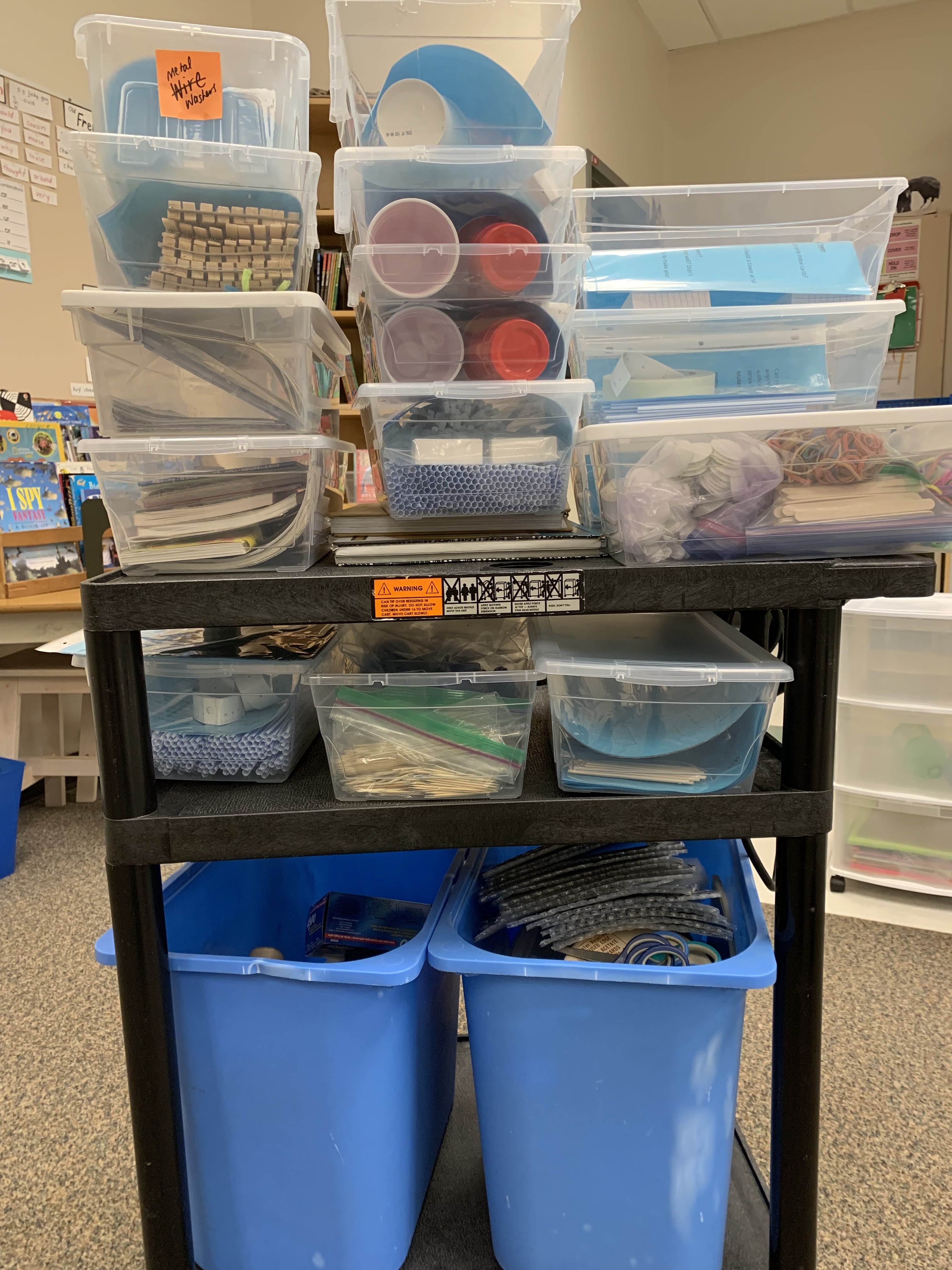
I repurposed a rolling trolley that used to hold a projector. I purchased several inexpensive clear bins with lids and grabbed some old bigger bins from home. I put a call out to my staff for specific recyclables and I began my research.

Next, I collected relevant materials that I already had in my classroom or at school. I pulled out origami and paper airplane books, as well as all my STEAM and maker books. These could be incorporated into the maker bins for inspiration and instructions. I made notes, and found samples of some ideas of projects that I had done with previous classes and made a trip to the dollar store. My colleagues (at school and at UBC) generously shared some of their resources with me. 


The more research I did, I realized that the purpose of the activities were quite different. Some of the activities were 'problem solving' tasks, others were 'creative' tasks. I changed the name of the Maker Cart to the STEAM Trolley as the activities were varied and covered all the disciplines: Science, Technology, Engineering, Art, and Math.


Developing curiosity, creativity, and collaboration are my key intentions for students using the STEAM Trolley.

I have shared the STEAM Trolley with my class several times since its conception. Students were highly engaged and worked with others while pursuing tasks. I overheard several students say, "This is hard!" but to my delight they stuck with their task and completed their projects. The open-ended nature of the activities lead students to laugh, instead of being upset when their plans didn't go as expected. It may have helped that I introduced my son's robotic team's motto, "Fail hard, fail often."

In Leading from the Library: Help Your School Community Thrive in the Digital Age, Miller and Bass suggest “When we give our students the opportunity to explore and create, we also improve our culture by offering new and exciting experiences.” (2019). A classroom maker trolley is a new and exciting experience for both my students and me. The bins can easily be swapped in and out, and by adding new ones to keep interest high.

In Beyond Books: Bringing Students Into the Library Through Creative Programming, Alicia Vandenbroek suggests, “As the role of the librarian continues to evolve, it is critical that we focus not only on books, but also on all the other resources we provide.” (2013). I incorporated several of Vandenbroek's most successful programs like origami, technical drawing, paper airplanes, and  friendship bracelets.  

Each bin contains everything needed for small groups of students to work, and many activities can be easily adapted for a whole class to use.

Two large bins that contain recyclables are for 'creative making.' In Tinkering With Makerspaces author Christopher Hunt says, "We try to go off book, and deviate from, or ignore, instructions. We try to throw away the cookie cutter (smash it, really). Each kid should be able to proudly say, “I made this; I’m impressed with my creativity; let me tell you how I did it; let me tell you about the things that went wrong; let me tell you how it works now, and what it is for….” With each of my students I kept challenging them to improve or adapt their projects to make it their own. I certainly had no problem with students sharing their creations. They were always quick to talk about what their project was and how they made it.

Pinterest 
I have collaborated with my school librarian to start a lunch time Maker Club.  We decided that the club would be for Grade 2 and 3 students because the Grades 4-7 students have lunch time opportunities such as choir and floor hockey.  We already have grade seven students that have expressed interest in leading the club. We are going to start with some simple winter crafts, then after the holiday open up the STEAM Trolley to the Maker Club. We will also offer the Spheros during an after school session as there won't be enough time during lunch. The advantage to using the Spheros after school is that parents can view their child's work when they are picked up. 

Why is fostering a maker culture important? There is an overwhelming amount of research that supports developing a 'maker culture' in schools and public spaces like libraries. In The Resilient Educator the article The Benefits of Teaching STEAM Lessons the writers describe benefits such as meaningful collaboration, increasing critical thinking skills, hands on experience, non-linear problem solving, and encouraging different ways to value the arts.

With a broader educational goal in mind What is STEM and Why is it Important? article the author and researcher David White concludes that teachers of K-12 are important influences in introducing the STEM concepts and that, "These concepts may lead to the students pursuing a STEM major in higher education and ultimately choose a STEM career within the workforce."

In Makerspaces: The Benefits the article outlines advantages that are close to my heart. It references recent research that supports that makerspaces are learner-centered, empowering, and authentic. “When we allow children to experiment, take risks, and play with their own ideas, we give them permission to trust themselves. They begin to see themselves as learners who have good ideas and can transform their own ideas into reality.” The article also explains that maker spaces help prepare students for the future. "Makerspaces are increasingly being looked to as a method for engaging learners in creative, higher-order problem-solving through hands-on design, construction, and iteration.”

“Ultimately, the interdisciplinary and empowering natures of these makerspaces can help prepare youth for a future we can’t yet imagine.” Davee, Regalla & Chang, 2015

Another important benefit of maker spaces is the high level of student interest and engagement, especially for students that may be struggling academically or socially at school. In Strategies to Engage Reluctant Learners  the article encourages teachers to support, encourage and empower their reluctant students by increasing engagement. This may look different for each student so teachers need to change their practice to reach all students. Many of the strategies to engage learners suggested in the article are authentically presented in a maker culture. A safe learning space, interest, choice and peer support are naturally embedded in maker activities.

The STEAM Trolley is just the beginning of my learning vision. There is more action to come in transforming my 'maker' dream into reality. I have taken a huge step in my own risk taking and technology skill development by creating a video to present to my staff, parent advisory and school district promoting the benefits of Maker culture in my elementary school. There is a greater purpose for this. I am hoping to secure some finances to purchase Lego for the school library. There are so many ways to use Lego bricks to enhance student learning and solve STEAM challenges. Here are a few links with some inspiring ideas: Ways to Use Lego in the Classroom,  30 Day Lego-STEM Challenge, and Printable LEGO Challenges for Kids.


Orchard School Lego Wall

Expanding the STEAM Trolley to include more digital and technical kits, something my school is lacking, will be my next goal. I will soon include bins with supplies to make penny spinners, catapults, umbrellas, cardboard structure pieces, egg drop kits... and then I can draw ideas from 26 Projects to Jump-Start Your Maker Space.

Equity is a huge concern for educators like me, working in a school that does not have many resources to draw from.  More than lacking, our school is lagging behind in learning opportunities that other schools in our district have had for years. I am hoping my video, presented to the right people, may lead to a larger collaborative action team that can work to bridge the gap in technology.

I have created a simple rubric for primary and intermediate students that can be used by teachers in assessing students. I have used the new reporting language that will be implemented next year and incorporated the Big Ideas in ADST (Applied Design Skill and Technology) as well as the Core Competencies. Sharing the STEAM Trolley with teachers and providing an assessment rubric is a small way that I can support my staff right now. 


My goal is to move my teaching experience and love of literacy into the library in the next year or so. As a Teacher-librarian I will be adding digital mentor to my list of responsibilities. I have stepped up my involvement in technology in a number of ways. I have made an intentional effort each week to learn at least one new skill and teach it to any staff member that is interested. I have made a point of reading every Tech Newsletter that is sent to me from my school district. I have learned timely and valuable tips in every issue. I have reached out to more tech savvy friends and colleagues to help me solve issues I can't figure out from youtube instructions. Instead of shying away from tech challenges I am trying to figure them out by including my students in the process.

My vision has action! See my next blog post to see my digital artifact embedded in my final blog Reflection 2.

References

About Us. Empower the Learner. (2021, August 29). Retrieved November 6, 2022, from https://empowerthelearner.com/about/

BC Ministry of Education. (n.d.). Applied Design, skills and technologies. Building Student Success - B.C. Curriculum. Retrieved November 12, 2022, from https://curriculum.gov.bc.ca/curriculum/adst

Brown, J. (2017). Uncovering the truth about Maker Spaces. In Canadian School Libraries Research Archive. 

Butler-Kisber, L. (2020). How do Makerspaces heighten student engagement? EdCanNetwork.

Cowen, A. (2022, November 4). 26 projects to jump-start your makerspace: Science buddies blog. Science Buddies. Retrieved November 20, 2022, from https://www.sciencebuddies.org/blog/makerspace-projects

Curriculum. (n.d.). Retrieved November 6, 2022, from https://curriculum.gov.bc.ca/

Davee, S., Regalla, L., & Chang, S. (2015, May). Makerspaces highlights of select literature. Retrieved from http://makered.org/wp-content/uploads/2015/08/Makerspace-Lit-Review-5B.pdf

Davidson, A.-L., & Price, D. W. (2018). Does your school have the maker fever? an experiential learning approach to developing maker competencies. LEARNing Landscapes, 11(1), 103–120. https://doi.org/10.36510/learnland.v11i1.926

Fingal, J. (2022, October 27). How curiosity, creativity and Student Agency unlock student learning. ISTE. Retrieved November 6, 2022, from https://www.iste.org/explore/education-leadership/how-curiosity-creativity-and-student-agency-unlock-student-learning

Hunt, C. (2019, March 18). Tinkering with makerspaces. Canadian School Libraries Journal. Retrieved November 20, 2022, from http://journal.canadianschoollibraries.ca/tinkering-with-makerspaces/

Littlebins. (2020, July 31). Printable Lego challenges for kids. Little Bins for Little Hands. Retrieved November 20, 2022, from https://littlebinsforlittlehands.com/lego-challenge-calendar-ideas-kids/

Makerspaces: The Benefits. curiositycommons. (2016, April 25). Retrieved November 20, 2022, from https://curiositycommons.wordpress.com/makerspaces-the-benefits/

Miller, S., & Bass, W. (2019.  Leading from the Library: Help your School Community Thrive in the Digital Age. (Links to an external site.) International Society for Technology in Education.

Nadelson, L. S. (2021). Makerspaces for rethinking teaching and learning in K–12 education: Introduction to research on makerspaces in K–12 education special issue. The Journal of Educational Research, 114(2), 105–107. https://doi.org/10.1080/00220671.2021.1914937

Otieo, C. (2017). Makerspaces: A Qualitative Look into Makerspaces as Innovative Learning Environment Catherine Otieno Follow this and additional works at: https://digscholarship.unco.edu/dissertations This Text. University of Northern Colorado Scholarship & Creative Works @ Digital UNC, 1–161.

pathway2success. (2022, February 2). Strategies to engage reluctant learners. The Pathway 2 Success. Retrieved November 20, 2022, from https://www.thepathway2success.com/strategies-to-engage-reluctant-learners/

Rouse, R., Krummeck, K., & Uribe, O. (2020, February). Making the most of a Makerspace. NSTA. Retrieved November 12, 2022, from https://www.nsta.org/science-and-children/science-and-children-february-2020/making-most-makerspace

Student Centered Education. Strategic plan 2021-2031 - north vancouver school district. (n.d.). Retrieved November 12, 2022, from https://www.sd44.ca/Board/StrategicPlan/Pages/default.aspx#/=

The benefits of Teaching Steam Lessons: Resilient educator. ResilientEducator.com. (2020, December 10). Retrieved November 20, 2022, from https://resilienteducator.com/classroom-resources/benefits-of-teaching-steam/

Vandenbroek, A. (2013, October). BEYOND BOOKS: BRINGING STUDENTS INTO THE LIBRARY THROUGH /J CREATIVE PROGRAMMING. Retrieved November 12, 2022.

Vongkulluksn, V. W., Matewos, A. M., Sinatra, G. M., & Marsh, J. A. (2018). Motivational factors in makerspaces: A mixed methods study of elementary school students’ situational interest, self-efficacy, and achievement emotions. International Journal of STEM Education, 5(1). https://doi.org/10.1186/s40594-018-0129-0

Ways to use Lego in the classroom. Teaching Ideas. (2019, September 18). Retrieved November 20, 2022, from https://www.teachingideas.co.uk/maths/ways-to-use-lego-in-the-classroom

White, D. (2014). What is STEM education and why is it important? - researchgate. What Is STEM and Why Is It Important? Retrieved November 20, 2022, from https://www.researchgate.net/publication/264457053_What_is_STEM_education_and_why_is_it_important

Www.facebook.com/mombrite. (2021, July 9). Free printable 30-day lego stem challenge calendar. Mombrite. Retrieved November 20, 2022, from https://www.mombrite.com/lego-stem-challenge-calendar/

Sarah D. Sparks, O. 30. (2020, December 17). Make learning personal. Make Learning Personal. Retrieved November 6, 2022, from http://kathleenmcclaskey.com/ 

Sunday, 13 November 2022

Final Vision Project: Learner Considerations


Maker activities provide authentic
opportunities for collaboration


"Makerspaces support multidisciplinary, individual, and collaborative learning through iterative error- and risk-tolerant tinkering, offering multiple points of entry including repairing items, building robots, and creating. We saw a direct relationship between developing maker competencies and the willingness to learn new tools." (Davidson and Price, 2017).

Why have Maker Spaces and STEAM projects created such a buzz in elementary and high schools across North America? What is their value to us as parents and teachers in British Columbia? How do these science, technology, engineering, art and math projects benefit students?


What is Maker Culture?

"Maker culture embodies do-it-yourself tinkering using tiny, affordable open-source computers, electronics, and recycled items to further sustainability, equity, social innovation, democratization of innovation, and community building. Makers engage in self-directed experiential learning through risk-tolerant, persistent problem solving in interdependent communities tackling complex, socially relevant problems." (Davidson and Price, 2017). Maker culture or Maker Spaces and STEAM are intertwined, and for the purposes of their connection to curriculum, are considered the same.

Although these STEAM activities are fun and engaging for students at school, I would like to inform parents and teachers of their deeper value. These activities can be designed to intentionally meet the curricular goals in both the BC Curriculum and our North Vancouver School District's strategic planning and visioning. It is no 'fluke' that our new curriculum has provided learning outcomes that encompasses STEAM activities.

Let’s take a look at the BC Curriculum…

The Core Competencies include several skills identified as essential for learner success. BC students are expected to reflect on their own development of these skills and give specific examples connecting their learning to the competencies. STEAM activities naturally provide authentic opportunities for students to practice collaboration, critical and creative thinking as well as personal and social understanding.

Core Competencies: BC Ministry of Education


Another curricular area Applied Design, Skills and Technology (ADST) naturally encompasses Maker and STEAM activities.  The Big Ideas directly connect to the Core Competencies. Both curricular areas include the same key words: knowledge, skills, technology, communication, ideas, purpose, joy, thinking, understanding, identity, and purpose.


ADST Big Ideas: BC Ministry of Education


Looking deeper into the intended curricular competencies of ADST, there are even more connections to deeper learning with STEAM or Maker activities. The ADST Curricular Competencies are loaded with skills that are necessary to be life-long learners.

Some of the key applied design and applied skills include: generating ideas and adding to others' ideas, gathering peer feedback, incorporating new ideas into a design, using materials safely, extending capabilities, reflecting on one's ability to work in a group, and telling others of their design story. All of these fit under the 'umbrella' of Communication, Thinking, and Personal and Social Skills from the Core Competencies.

There are also obvious curricular connections within the academic subjects of Science, Math and Art in all grades from Kindergarten to Grade 12.

Equity and access to STEAM activities continues to be an issue. Schools with healthy economic backing supply an assortment of digital technologies for students while other schools simply can't afford the 'extras.' The broad definition of Maker Space or Maker Culture can encompass hands on activities that develop skills even without the digital component. For example, 'Breaker Spaces' where students take apart broken products can learn about how they are made, or play hands on games that use the concepts of coding.

How about my School District Strategic Plan and Visioning Statements…

On our NVSD website it is easy to find our District's Vision, Values and Goals. The first sentence under Strategic Plan states, "The North Vancouver School District provides world-class instruction and a rich diversity of engaging programs to inspire success for every student and bring communities together to learn, share and grow."

NVSD Vision, Values, and Goals
Specifically, listed under Goals, the NVSD states Student-centered Education, Innovative Instruction and Mental Health and Well Being as three of the six goals of our school district. Each of these has been proven to be embedded in student learning during STEAM activities.


  Here is what the research says…

There is an overwhelming volume of research that supports the implementation of STEAM and Maker Spaces. Increased engagement, collaboration skills, and problem solving skills are benefits one would expect. Interestingly, participants in STEAM workshops developed an increased sense of wellness and strong sense of community. Some research also states that participants develop a growth mindset and confidence.

Curiosity Commons has published an article titled Makerspaces: The Benefits. The site describes many benefits and also points out that the actual product is irrelevant. “What is made may not matter at all; it can still influence the thought process, vision, and ability to connect of a learning maker." (Curiosity Commons).

The National Inventors Hall of Fame Journal has also published What are the Benefits of a Makerspace? Learning to take failure in stride, hands-on learning, opportunities for innovation, and developing a wide range of 21st learning skills are some of the claims stated in the article.

The Resilient Educator published the article Benefits of Teaching STEAM Lessons on their website. They list collaboration, developing creative and critical thinking, and hands on experience as benefits, as well as encouraging girls in STEAM.

In the Learning Landscapes Journal titled: Does Your School Have the Maker Fever? An Experiential Learning Approach to Developing Maker Competencies, authors and researchers Davidson and Price conclude in their study that, "Our analysis suggested key themes of initiative, playful learning, authentic adaptation, interdependence, and over resourcing. These themes can be developed into “maker competencies” to meet 21st century needs." (Davidson and Price, 2017).

Maker Spaces and STEAM activities have many overlaps within the BC Curriculum and our NVSD goals and vision. Not only are activities engaging and fun, but prove to develop resiliency and social emotional benefits.

My final project is meant to educate parents and teachers of the value and deeper intent of these activities. Perhaps with increased awareness and support from parents and teachers we can advocate for more equitable funding for digital resources in 'have not' schools like mine.

After all, all students, regardless of their parent's income, deserve a "world class instruction and a rich diversity of engaging programs." (NVSD website).


References

BC Ministry of Education. (n.d.). Applied Design, skills and technologies. Building Student Success - B.C. Curriculum. Retrieved November 12, 2022, from https://curriculum.gov.bc.ca/curriculum/adst

Curriculum. (n.d.). Retrieved November 6, 2022, from https://curriculum.gov.bc.ca/

Davidson, A.-L., & Price, D. W. (2018). Does your school have the maker fever? an experiential learning approach to developing maker competencies. LEARNing Landscapes, 11(1), 103–120. https://doi.org/10.36510/learnland.v11i1.926

Fingal, J. (2022, October 27). How curiosity, creativity and Student Agency unlock student learning. ISTE. Retrieved November 13, 2022, from https://www.iste.org/explore/education-leadership/how-curiosity-creativity-and-student-agency-unlock-student-learning

Makerspaces: The Benefits. curiositycommons. (2016, April 25). Retrieved November 13, 2022, from https://curiositycommons.wordpress.com/makerspaces-the-benefits/

Nadelson, L. S. (2021). Makerspaces for rethinking teaching and learning in K–12 education: Introduction to research on makerspaces in K–12 education special issue. The Journal of Educational Research, 114(2), 105–107. https://doi.org/10.1080/00220671.2021.1914937

Student Centered Education. Strategic plan 2021-2031 - north vancouver school district. (n.d.). Retrieved November 12, 2022, from https://www.sd44.ca/Board/StrategicPlan/Pages/default.aspx#/=

The benefits of Teaching Steam Lessons: Resilient educator. ResilientEducator.com. (2020, December 10). Retrieved November 13, 2022, from https://resilienteducator.com/classroom-resources/benefits-of-teaching-steam/

Vongkulluksn, V. W., Matewos, A. M., Sinatra, G. M., & Marsh, J. A. (2018). Motivational factors in makerspaces: A mixed methods study of elementary school students’ situational interest, self-efficacy, and achievement emotions. International Journal of STEM Education, 5(1). https://doi.org/10.1186/s40594-018-0129-0


Sunday, 6 November 2022

Key Elements in My Vision for Teaching in the 21st Century

    When I was first asked to think of key words that shape my teaching and direction of learning, I created a word cloud. Integral words included: engagement, curiosity, inquiry, collaboration and educational balance. With this in mind, how do I move forward in my growth as an educator? What is this going to look like in my classroom? How will this look when I become a teacher-librarian?


As I transition into the final phase of this course I believe the key elements for my final project are:

1. Balancing Digital Literacy in My Classroom

2. STEAM in My Classroom and Beyond

3. Connecting ADST Curriculum With Our New Assessment Language

Balancing Digital Literacy in My Classroom

In How Curiosity, Creativity, and Student Agency Unlock Student Learning, the author Jerry Fingal states, “Unfortunately, many educators still use technology in ways that are just a substitute for analog learning, he said, citing a few examples: “We take textbooks and scan them and then we have digital textbooks. Instead of boring lectures, we have boring lectures that are recorded on video. Those are not strategic uses of technology for learning because they are passive, not active.” (ISTE, October 2022).

My goal is to move from passive use of computers and ipads to active use. This is going to be tricky in that I have very little access to our school devices. On Friday, it was my allotted time to use the computers and four teachers came into my room before the bell. One teacher pulled 6 laptops for her class, another took 2, and the others asked for 4 each. I had to justify my use of them and ask for some back so that my students could each use one.

I’ll be honest, I teach primary students and logging on is still a challenge, but they are getting more independent and capable each time we use them. Our classroom use of the devices has been mostly passive. We use the laptops to read on Epic (while I work one on one with my most struggling readers), and to post work to their Scholantis Portfolios. I still have not tried using the Spheros but will before the end of this school term. Keeping in mind that parents of my students this year have been very clear that they do not want their children online very much at school. There are lots of great resources online that focus on digital literacy skills that I can use to direct teach to the whole class on my computer projected large scale.
 

STEAM in My Classroom and Beyond

STEAM (Science. Technology. Engineering. Art. Math) in the classroom is what I am most excited about right now. I have put together a STEAM trolley (cart) with an assortment of bins with challenges and supplies. Some of the activities can be done with a whole class at once, others done in small groups or as an individual. I have included several activities that touch on each of the STEAM subject areas on the trolley. I have also tried to include activities that are low cost or use materials that are free and can be recycled.

On Friday afternoon, I challenged my students to make a marble maze from their pizza box from the hot lunch program. This STEAM challenge is not included on the cart but I will write it as a lesson and include it because our school has pizza lunch once a month and so all classes could easily do it. Building the maze was a challenging task for grade three students. I usually teach older students so I had forgotten how hard it is to cut cardboard with small scissors. Luckily I had a stash of adult size scissors they could use. It took a surprisingly long time to plan, cut and tape pieces. Although students were fully engaged the entire time, no one finished. However, the student's excitement helped them persevere through their challenges.

I am looking forward to finishing the mazes on Monday and then testing them with marbles. I am most curious to see how their reflections, self-assessment and improvements to their design develop throughout this week.

On a completely different open-ended learning task, I challenged my students to create 'monster eyes' on Halloween. What a fun activity! Student engagement was high and the creativity soared. My grade three students also helped their kindergarten buddies make 'an open-ended' paper monster. This collaborative activity was also successful. The discussions were rich with questions, problem solving and choice. The open ended nature meant that every project was successful as there was no 'right way' to make it. 

Connecting ADST Curricular Big Ideas With Our New Assessment Language

Our school district is implementing new language in assessment next year. My staff had a workshop introducing the incoming assessment structures last week. I am excited to start connecting the assessment language of ADST Big Ideas from the BC Ministry of Education, and reworking it to fit the new rubrics using the Curricular Competencies. I think this will be of great benefit to my entire staff. There are few Big Ideas in ADST for Kindergarten through Grade 7 so it is a manageable task for me to complete as part of my STEAM Trolley (which can be borrowed by teachers in the school). I do think it is important to have the curricular competencies embedded in the learning outcomes and assessment of the STEAM activities. Teachers using the kits can use the rubric language as comments on student report cards or adapt them for their own maker projects.

Kathleen McClaskey, CEO and chief learning officer of Empower the Learner and author of the book Make Learning Personal, shared seven elements of learner agency that help move educators from a teacher-centered environment to a student-centered environment and, ultimately, to a learner-driven environment. These are: voice, choice, engagement, motivation, ownership, purpose, and self-efficacy. Read more in the ISTE October 22 journal.

McClaskey writes, “Personalized learning is not what is done to the learner or about tailoring the learning. It is about helping each learner to identify and develop the skills they need to support and enhance their own learning so that agency and self-advocacy can be realized.” Maker activities or STEAM challenges are empowering for students and touch on each of the seven elements that McClaskey lists in a student-centered environment.

My Vision for Teaching in the 21st Century

My future vision extends beyond my classroom. Hopefully I will soon be in a library. I can recreate a STEAM Trolley complete with self-assessment and teacher assessment rubrics for students with the newest language. At this point, I think my final presentation will be a slide show that includes photos, videos and rational of students working through the STEAM trolley challenges. This presentation can be presented to my current staff and then my new staff when my position changes. I am hoping this bundle of student-centered activities is a helpful resource for colleagues. It is likely that my new school will have more resources and so I can include more coding activities as part of the STEAM Trolley.


 I am excited to share and help my fellow teachers.


Resources

About Us. Empower the Learner. (2021, August 29). Retrieved November 6, 2022, from https://empowerthelearner.com/about/

Curriculum. (n.d.). Retrieved November 6, 2022, from https://curriculum.gov.bc.ca/

Fingal, J. (2022, October 27). How curiosity, creativity and Student Agency unlock student learning. ISTE. Retrieved November 6, 2022, from https://www.iste.org/explore/education-leadership/how-curiosity-creativity-and-student-agency-unlock-student-learning

 Sarah D. Sparks, O. 30. (2020, December 17). Make learning personal. Make Learning Personal. Retrieved November 6, 2022, from http://kathleenmcclaskey.com/


Sunday, 30 October 2022

What I Am Most Excited About In My Learning Journey


"Curiosity is one of the most permanent and certain characteristics of a vigorous intellect." Samuel Johnson


My key ‘takeaways’ during this learning and exploration are many. I am most excited about formalizing instruction in Applied Design, Skills and Technology (ADST) for not just my classroom, but my school. I have also benefitted from connecting with teachers and teacher-librarians across Canada. It is helpful to have perspectives from other provinces, especially because I have had little contact with professionals outside my own school district within BC. Equity continues to be one of my pressing concerns. As my discussions with colleagues develop, it is so clear that students across Canada do not have the same opportunities.

Applied Design, Skills and Technology (ADST)

The benefits of challenging, hands on projects for students have always motivated me to try new activities with my class. Sewing, weaving, making Rube Goldberg Machines, Caine's Arcade, and making simple machines are some of my favourites.  


The important thing about all of these activities is that students are excited to design, and execute their plan to create something beyond their comfort level. Along the way are many challenges that are unique to each project. Creative and critical thinking are some skills that are honed as well as practicing determination, and a growth. Collaboration and communication are also competencies that are enriched through problem solving.

I have recently created a STEAM Trolley (Science. Technology. Engineering. Art. Mathematics) for my classroom and school. Currently, I am formalizing the rationale and assessment but the activities are ready to be used. Enhancing student learning through engagement and collaboration are key goals for the STEAM Trolley. I have tried to include a variety of challenges from each of the STEAM subject areas. My class is keen to test the activities and give me feedback before ‘opening’ the trolley to the school as a lunch time 'Maker Club.'

Blog Connections

Blogging is new to me. It has been a steep learning curve.  It is hard to believe my anxiety was so high when I was figuring out how to set up my blog site. Inserting links and images are so quick for me now. I still struggle with some formatting issues, but I am working through my challenges with help from a friend (and former student). It is good for me to work outside my comfort zone, as this is what I expect of my students. I am gradually becoming proficient enough to help others. 

As mentioned, it has been beneficial to chat with colleagues outside my school district. Everyone brings their own set of skills and experiences to their blog site and discussions. When knowledge is shared, we all benefit. I have learned of some great sites and programs from my peers. Some highlights to try are Dewey of the Week, Code Spark, Typing.com (I would like to open to students and parents afterschool), Control F (I have shared this with intermediate teachers on my staff), Applied Digital Skills, and How to Spot Fake News. 


Equity

Funding from Parent Advisory Committees (PAC) vary from school to school and tend to fund technology for most schools. My sister-in-law heads the PAC at her children’s school in an affluent area. Cheque writing campaigns, and other fundraising can generate thousands of dollars in time as short as one week. She has told me her PAC likes to have at least $40 000 in the bank after spending on large projects like replacing ipads for each classroom. 

At my school, our PAC is active but doesn’t have the same access to funds. Our fundraising efforts are limited, and they ask for money from families that don’t have much disposable income. Our school budget has to help cover the costs of students who can’t afford school supplies and field trips. We also pay for a food access program for hungry students. There isn’t much money left over. Recently, we have been informed of an Equity Fund from our School District. Our principal published this information in the last school newsletter and the response was overwhelming. Our school's equity funds are already depleted for the year.

Our PAC purchased 30 ipads for our school which we are grateful for, but we share them across our school. Many of the exciting programs and coding activities are online. Compare a school like my niece and nephew’s, where every child has a device to use whenever needed, with my school where each class has access once a week for 45 minutes. Many private school have a ‘bring your own device policy’ (BYOD), but most of my students would never be able to afford that. My school has to make careful choices in purchasing licenses for programs where other schools have the luxury of purchasing what they like.  Teachers are often given 'class funds' from the PAC to spend on expenses for the classroom. My small amount was spent in September to purchase folders and cardstock for classroom learning. The supplies for my STEAM Trolley were purchased with my own funds. 

Opportunities for students and teachers are not equal. 

When I hopefully have a job in a school library, one of my priorities will be opening the library afterschool for parents and students to use the computers. I would like to help parents with setting up School Cash Online (how they pay school fees), MyEdBC passwords, TEAMS, and other related computer issues that parents struggle with.  

When I move out of my classroom and into a school library, I am most excited about supporting students, staff and parents throughout my school. "How can I help you?" will be my motto. How can I help teachers with skills, technology, and literacy? How can I help students access the resources they need to become critical and creative thinkers? How can I support parents with access to internet, devices and skills to use the expected school services?  In order to help others, I will need to nurture my own curiosity and challenge myself to step outside of my comfort zone. 

I am looking forward to the journey.

Sunday, 23 October 2022

Development of Libraries Around the World

“The classroom was a jail of other people’s interests. The library was open, unending, free.”

― Ta-Nehisi Coates

I’ll be the first to admit that as a classroom teacher working full time, back at university, and a full time mother… I am overwhelmed with the urgent needs of my students, and my family. I have rarely pondered the academic plight of developing nations.

In the past couple of years I have personally packed up 15-20 boxes of discarded books to be removed from our school. These books were worn out, irrelevant and contained text and images that were racist, or otherwise offensive in some way. I did not question where the books were going. I assumed most would get recycled. I had done my job by clearing the school shelves. The end destination of these books was someone else’s issue.

As a teacher who has worked mostly in inner city schools, our libraries have often been the recipient of used books from well-intentioned donors. Some of these books have been great. Most have not. The time needed to sort, ‘re-donate’ or recycle the
books is vast. I have often had the thought, “My students deserve better.” Meanwhile, I have played a part in sending our unwanted books to less privileged libraries.

In Donations to Libraries: A Problem In International Cooperation, Paul Sturges states, “Donations of books and other materials received by libraries in developing countries reveals the paradox that a gift can be more of a problem than a blessing.” He describes the dilemma of ‘receiving’ countries facing with the problem of disposing rubbish books or shelving worthless or harmful ones containing propaganda or racism. Many libraries, both public an academic, feel obliged to be grateful because they have such a large role in supporting education with very few resources.

Sturges states, “Unfortunately, in practice the majority of donations are more of a problem than a benefit: they cost money to deal with and can be an embarrassment by expanding the collection rather than by improving it.”

Creating a responsible program to support libraries in developing nations includes taking into account the needs and sensitivities of the potential beneficiaries. Sturges suggests that donors purchase books published in the country or region of the recipients rather than sending books that are irrelevant.

Digital resources in developing nations may be part of the solution for patrons to access more up to date and relevant information. The Bill and Melinda Gates Foundation states on their website, “We focus on issues we think are the biggest barriers that prevent people from making the most of their lives.” Funding the development of libraries with access to computers and the internet, along with healthcare
are priorities of the foundation.

“There are more than 320,000 libraries worldwide, 73 percent of them in developing and transitioning countries. In many communities, public libraries are the only place where any person, regardless of education or skill level, can have access to information and resources such as computers and internet access free of charge. Moreover, library staff often provide training and support for first-time internet users as well as those looking to improve their skills—many of whom would otherwise be left behind.” (Gates Foundation website).

It is not just developing nations that need libraries to provide access to computers and the internet. It became clear during the early stages of the Covid pandemic that many families at my school lacked devices, internet and skills needed to access critical information and connect to their communities.

“Equality of opportunity in the digital age requires that all individuals have access to online information and digital tools along with the skills to create content, assess and use information, and participate fully in a digital world.” (Gates Foundation website).
 
In Digital Inclusion, Learning and Access at the Library, authors Melissa Morrone and Shanelle Witt write, “The concept of life-long learning has long been associated with public libraries and that mandate coupled with the availability of computer stations and other technology makes us an important source of information and literacy instruction.”(2013). Their research states that in the United States library staff spend a large portion of their time supporting patrons with job seeking, resume writing, and setting up emails for the first time. They acknowledge in their article that many patrons required help with basic skills to participate in society. “Job seekers and workers alike need to have a baseline familiarity with technology. Applications tend to be online, even if the job itself doesn’t require use of a computer.” (2013). Libraries are the places with the technology and staff to support people without these resources.
On the Gates Foundation website, it states that in the United States 77 million people use the public library to access the internet each year. In rural Botswana, public libraries serve as small business offices, and in Romania 41 000 farmers filed online applications for agricultural subsidies in public libraries in one year. (Gates Foundation website).

“The only thing that you absolutely have to know, is the location of the library.”
― Albert Einstein


Libraries have a critical role in equity of access so everyone, even those without personal technology can become digitally literate.

Mobile Devices and Literacy Opportunities Through Access to the Internet

How can mobile devices help libraries, both in developed and developing nations? Many school libraries and classrooms are developing policies where students can use their own devices at school. My own children, one in high school, the other in university, both are trusted with a BYOD, or “Bring your own Device” policy. Even in high school most classes have structured online study groups, and collaborative group projects through Microsoft Teams. Teachers encourage students to access online tools to assist their learning in high school.

The elementary school where I teach is still a 'No Cell Phone' zone for students. Many of the local private schools have a BYOD policy, starting as young as kindergarten. I get it. Having students bring their own device means the school passes the responsibility of purchasing and maintaining the devices on to parents. It is a massive cost savings to the school.

In public schools, one cannot assume that everyone can afford or have the skills to support their child in this. Public schools in higher socio-economic communities again, have the advantage. Parents can fulfill the request of sending their child to school with a device, where in lower income areas, many cannot.

In theory teaching students how to use these personal digital ‘tools’ safely and responsibly at school is terrific… if students have their own mobile devices. It is critical that schools also have current, functional devices for school use.

A month ago, our school library acquired two older desktop computers so students can browse our book collection. Wrap your head around that! In the year 2022, my students can for the first time, search their library collection on a computer. 

Equity. 

Access. 

We do not have a level playing field in public schools. If students at my school were allowed personal devices, they would have had access years ago.


In Canada, the provincial Ontario Ministry of Education has a 'no cell phone' policy in all schools. There are exceptions for educational, medical, or circumstances 'to support educational needs’ of students. Their website claims it is to prevent distractions from learning and to reduce screen time.

British Columbia has not followed Ontario’s example. "School districts are responsible for setting local policy that meets the unique needs of their student populations," a statement from the BC Ministry of Education said in a CBC News interview. "This includes developing policies addressing the use of wireless technology, including cellphones, in schools and implementing the appropriate technology necessary to support the education needs of their students." (2019).

In Surrey, B.C. spokesperson Doug Strachan said that the district looks for ways to incorporate cell phones into learning. He states, "These are the tools that our kids are growing up with. They're connected all the time," Strachan said. "It's really a question of encouraging students to use them properly and appropriately and at the right times."

On the other hand, I know of many teachers that complain that cell phones are a constant distraction for students. Online bullying, and students accessing inappropriate material are a couple of other important issues that need to be continually addressed by teachers.

So, how can we as educators create responsible literacy opportunities and expand access to the internet and information databases?

As a teacher, I use mobile devices all day long in the classroom. I use my camera to document student learning and then post it to our classroom Microsoft Team for students and parents to access. I organize and show videos, both created by me or by contributors on the internet to ‘subject’ channels on Teams. Parents and staff communicate with me by email, chat or text. What if my students had the same access? It would be too much for my Grade 3 students but older ones will need to learn how to manage their 'access to information' while at school or at work.

Access to online books comes to my mind when I think of benefits for students. Working or busy parents can't always take their children to the library. Reading A-Z, Epic, Storylineonline, are a few accounts that our students in our community use at school and at home. Mathletics and Ten Monkeys are two math programs that our school has memberships for. My own children use Quizlet, Desmos (graphing calculator), and WolframAlpha. Using devices for research is a given, and teaching students how to evaluate resources is a critical part of 21st Century Learning. Older students, including my own have used green screens, book trailer apps, and imovie to generate school reports.

My son and his friends, use Instagram to post their mountain biking videos. This has led to a 'cash flow' for one of my son’s friends. Several of these teens have gotten comments from famous professional riders. My son and his friends are networking and building social media success and future opportunities. My daughter's friend, also in high school, publishes images of her art online which has led to commission work for two large companies.

The potential of learning and creative expression is endless with mobile devices. Cell phones can be used to document science experiments, photograph and film relevant data and evidence in the arts and humanities, and network with others worldwide.

“You want weapons? We're in a library. Books are the best weapon in the world. This room's the greatest arsenal we could have. Arm yourself!"
(Doctor Who, from Tooth and Claw in Season 2)”
― Russell T. Davies


Libraries are no longer just the institutions that house books promoting literacy and empowerment, they connect patrons to the devices and skills to embrace the far reaching ‘arsenal’ of global information and communication through the digital world. 

 Look out, everyone! Our young people are arming themselves with digital tools that are evolving more rapidly than books.

References

Britten, L. (2019, March 12). B.C. won't follow Ontario in banning cellphones in class. CBC News. Retrieved October 23, 2022, from https://www.cbc.ca/news/canada/british-columbia/cellphone-ban-ontario-1.5054099

Global libraries. Bill & Melinda Gates Foundation. (n.d.). Retrieved October 23, 2022, from https://www.gatesfoundation.org/our-work/programs/global-development/global-libraries

Morrone, M., & Witt, S. (2013). Digital Inclusion, Learning and Access at the Library. Urban Library Journal, 19(1).

Province of Ontario. (n.d.). Cellphones and Other Personal Mobile Devices in Schools. Ontario Ministry of Education. Retrieved October 23, 2022, from https://www.ontario.ca/page/cellphones-and-other-personal-mobile-devices-schools

Sturges, P. (2013). Donations to Libraries: A Problem in International Cooperation.


Critical Literacy in Accessing Internet Reference Resources

  “The one real goal of education is to leave a person asking questions.”  Max Beerbohm What is critical literacy?      Critical literacy is...